AI-Powered Sauna
CAD Generation Platform
Transforming customer conversations into technical sauna drawings through an automated multi-model AI workflow.
Manual drafting is a
Every technical sauna drawing used to travel through a chain of people. The customer described a vision; sales relayed it; a drafting team translated it into dimensioned CAD; engineering validated it; only then could a quote follow.
Where the time goes
Each request consumed multiple conversations, manual drafting, technical validation, and sales coordination. That slowed response times and consumed valuable R&D resources on repetitive first-pass work.
Time to a drawing + quote
~99.9% fasterFrom days of human turnaround to a self-service drawing generated in roughly two minutes, while the lead and full requirement transcript are captured automatically.
One conversation, a
A public chat widget runs the entire workflow end to end: it gathers requirements, qualifies the lead, synthesizes a structured CAD dataset, renders the drawing, and hands off to sales, with no human in the loop.
AI Conversation
A requirements assistant chats with the customer, strictly scoped to sauna dimensions, door type, and accessories.
Requirement Collection
Outer and inner dimensions, wall thickness, bench heights, room height and door type are gathered conversationally, one or two questions at a time.
Lead Qualification
Name, email, phone and country are captured inline and validated, turning an anonymous visitor into a contactable, specified lead.
CAD Dataset Generation
The transcript is forced into a fixed reference template, a deterministic, structured plaintext blueprint of the unit.
Technical Drawing Generation
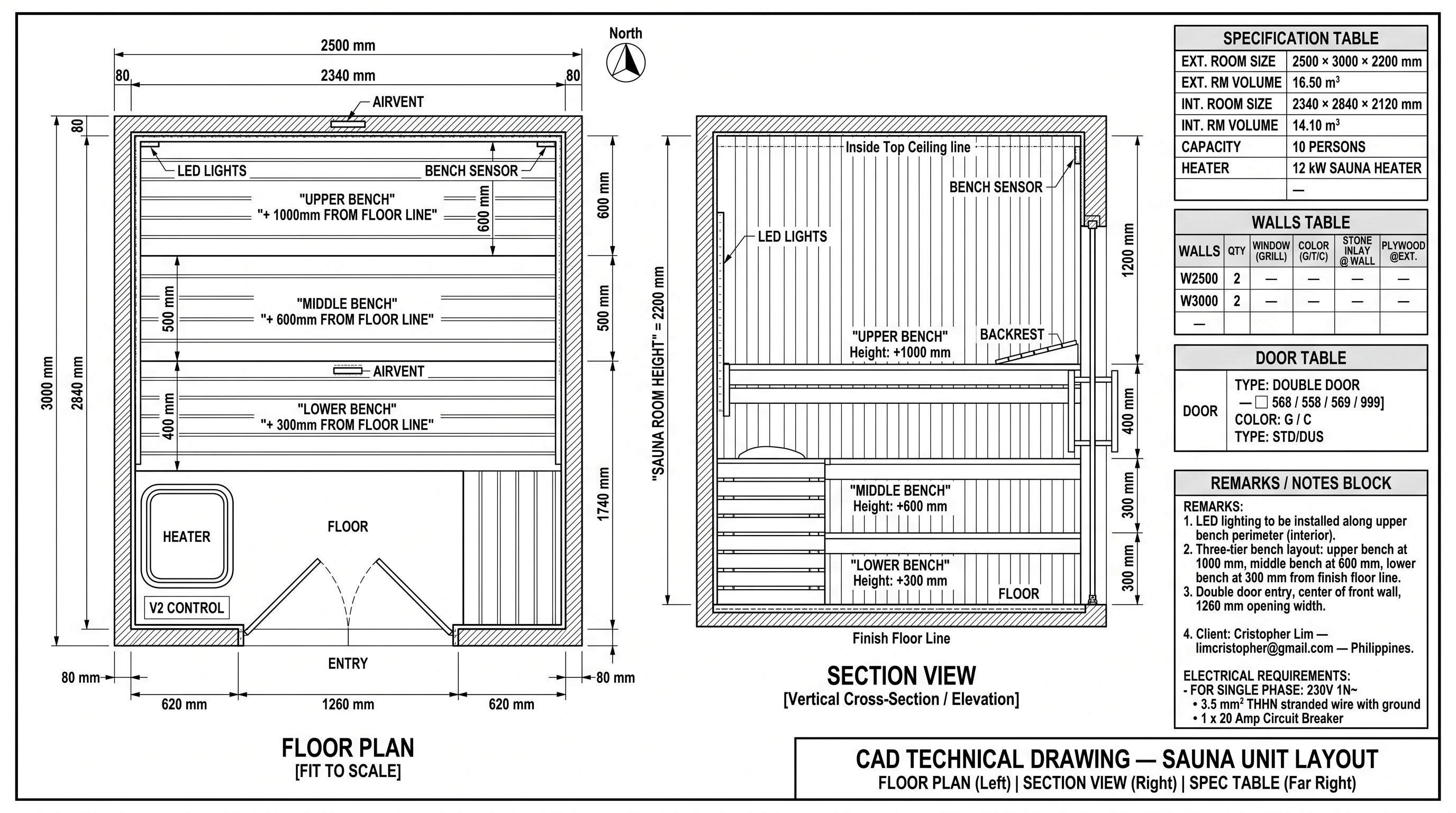
An image model renders the dataset into a monochrome CAD drawing: floor plan, section view and specification tables.
Sales Handoff
One click flags the session and emails sales a branded message with the drawing inline, plus PNG and PDF attachments.
The interface that requirements
The real chat flow: a friendly greeting, inline lead capture, scoped spec gathering, then a hidden trigger tag that silently launches the generation pipeline.
Scoped, not chatty
The system prompt keeps the model strictly on sauna measurements, door type and accessories. If the user drifts off-topic it gently steers back, and it never asks for contact info, since that is the dedicated lead step.
Lead capture state machine
The hidden trigger
When the model has enough and the user confirms, it ends its reply with [READY_TO_GENERATE]. The widget strips the tag and auto-runs the two-step pipeline. It is model-driven orchestration with zero extra clicks.
Image generation preview
Click to view →One paste into
The generator ships as a self-contained widget with a ready-to-paste embed block. Drop it into WordPress, Webflow, or any HTML page and it runs against the same secure backend, with the API key staying server-side.
<!-- SAWO CAD Generator: paste anywhere -->
<iframe
  src="https://sawoaicad.vercel.app/conversation-wp.html"
  title="SAWO CAD Generator"
  width="100%" height="760"
  loading="lazy"
  style="border:0;border-radius:16px;max-width:1100px">
</iframe>
A multi-model pipeline
Every phase reads its model from a dropdown, so each step runs on whatever model fits your needs and budget. We integrated several models and A/B-tested two presets. Pipeline 2 is the improved configuration.
Pipeline 1 · Single model
$0.0201 / msgClaude Opus 4.6 Expensive
Gemini 3 Pro Image Premium render
One capable model does everything, including the cheap back-and-forth chat. Accurate, but Opus tokens are spent even on basic questions.
Pipeline 2 · 3-model split
Improved · ~28% cheaperDeepSeek V4 Flash Much cheaper
Claude Opus 4.6 Expensive
Gemini 3 Pro Image Premium render
Route the chatty gather to a cheap model and reserve Opus for the one synthesis step. Same drawing, far less spend.
Every phase is configurable
Change a dropdown, no redeploySame quality
Opus still owns the single high-value synthesis step, so the dataset and the final drawing are identical to Pipeline 1.
Faster gather
DeepSeek V4 Flash answers the rapid Q&A at ~1,386 ms average, the fastest of the three models in testing.
Lower cost
The gather phase drops from Opus rates to about $0.0001 per message, so spend collapses while output stays the same.
From description to
The core transformation: loose customer language becomes a rigid structured dataset, which becomes a precise monochrome technical drawing.
FLOOR PLAN [FIT TO SCALE]
Total Width  : 2500 mm
Total Height : 3000 mm
Inner clear  : 2340 × 2840 mm
Room height  : 2200 mm

INTERIOR ELEMENTS
[A] UPPER BENCH +1000mm
[B] MIDDLE BENCH +600mm
[C] LOWER BENCH +300mm
[D] HEATER 12 kW  [F] ENTRY
[H] LED LIGHTS  AIRVENT x2

SPEC TABLE
CAPACITY : 10 PERSONS
DOOR     : DOUBLE 1260mm
INT VOL  : 14.10 m3

REMARKS
- LED lighting along upper bench
- Bench sensor, extra airvents
Generate the complete technical
CAD drawing canvas image now.
The reference template is the key trick. By forcing a probabilistic model to fill a fixed scaffold of headers, tables and field labels, every drawing comes out structurally identical, with only the values changing. Actual generated output
What happens
The drawing is only half the value. The same flow captures the lead, persists everything, and pushes a sales-ready notification, an automation chain that runs without staff lifting a finger.
Lead capture
Conversation storage
Drawing storage
CRM handoff
Sales notification
Email generation
We A/B-tested the
Every AI call is logged with real USD cost, tokens, latency, provider and pipeline mode. Running both presets through the same 19-call workload showed exactly where the money went, and how Pipeline 2 cuts it without changing the output. Observed in A/B testing
Pipeline 1 vs Pipeline 2 · same 19-call workload
From the Comparison tabPipeline 1 ran 19 calls at $0.0201 per message; Pipeline 2 ran the same 19 at $0.0144, about 28% cheaper. The split moves the 17 chatty gather calls onto DeepSeek V4 Flash (a few tenths of a cent total) while Opus and Gemini still produce the identical dataset and drawing.
What testing revealed
Drilling into a Pipeline 1 conversation showed every GATHER call running on claude-opus-4.6, the most expensive model, just to ask the customer simple questions. That single observation drove Pipeline 2: keep Opus for the one analysis step, hand the gather chat to a basic model, and let it talk to the image generator. Same output, much lower bill, and any phase is still swappable for your budget.
Daily spend by model
Hover to identify · last 14 daysPer-model comparison
| Model | Msgs | Tokens | Cost | $/1K | Latency |
|---|---|---|---|---|---|
| claude-opus-4.6 | 19 | 36.8K | $0.358895 | $0.0098 | 1,646ms |
| gemini-3-pro-image | 2 | 8.9K | $0.293400 | $0.0329 | 10,031ms |
| deepseek-v4-flash | 24 | 25.6K | $0.003150 | $0.0001 | 1,386ms |
DeepSeek V4 Flash is both the cheapest per token and the fastest, which is exactly why it is the gather model in Pipeline 2.
Spend by model · Pipeline 2
Rendering and the single analyze call now dominate cost; the 17 gather calls are a rounding error. Exportable as CSV / JSON.
End-to-end,
A three-tier system where the serverless API is the only holder of secrets. The browser never sees a key or touches the database; identity and role are re-validated on every call.
Secrets stay server-side
RLS-locked DB, service-role access, httpOnly cookie sessions.
No build step
Plain files + serverless functions deploy straight to Vercel.
Provider-agnostic
Swap any model from the Settings page, no redeploy.
Repetitive technical work,
By automating the first-pass drawing and the lead intake, the platform frees engineers and drafters to focus on final, edge-case work, while sales receive richer, faster opportunities. Illustrative outcomes
The R&D and drafting teams no longer absorb repetitive first-pass requests. Engineering effort shifts from "redraw the same unit again" to genuine design work, while every website visitor who finishes a conversation becomes a specified, contactable lead with a real technical deliverable attached.
Everything the platform
AI CAD Generation
Turns a chat into a dimensioned monochrome technical drawing: floor plan, section view and spec tables.
Lead Qualification
Inline, validated capture of name, email, phone and country before the spec interview begins.
Conversation History
Every session, including transcript, lead, dataset and drawing, persisted and browsable in the CMS.
Analytics Dashboard
Token, cost, latency and provider breakdowns by model, phase, pipeline and day.
Cost Tracking
Real USD cost captured per call via OpenRouter, with CSV/JSON export for finance.
CMS
No-build role-based console for logs, users and AI configuration, deployed on Vercel.
Email Automation
Branded sales email with the drawing inline plus PNG and PDF, via the WordPress relay.
Admin Management
Create and manage users, configure models, switch pipeline mode, send test emails.
Role Permissions
Admin and sales roles enforced server-side on every call. The edge redirect is just the first gate.
Multi-Model Routing
Each phase reads its model from a dropdown, routed via OpenRouter. Tune quality, speed and cost to your budget, no redeploy.
A/B-Tested Pipelines
Single-model or cost-optimized 3-model split, toggled live from Settings, with the analytics to prove the ~28% saving.
Embeddable Widget
Ships with a paste-ready embed block. Drop the generator into WordPress or any site in one snippet.
Per-Conversation Analytics
Every log opens its own drawer: tokens, cost, latency, pipeline and per-call detail for that one session.
Drawing Viewer
Zoomable lightbox and PNG download, with live token/cost metrics during generation.
The hard parts,
AI orchestration
A model-emitted [READY_TO_GENERATE] tag acts as a state machine, cleanly transitioning from gathering to a multi-call generation pipeline with no extra UI.
Prompt engineering
A fixed reference template turns a free-form model into a deterministic structured-data generator, the contract that makes every drawing consistent.
Cost optimization
A cheap/expensive model split, an ephemeral prompt-cache breakpoint, and a 16-message conversation window keep spend low without hurting output quality.
Drawing consistency
A strict "monochrome black-linework CAD" image prefix plus the structured dataset yield repeatable, professional technical drawings instead of marketing renders.
Data management & the 4.5 MB cap
Multi-MB base64 drawings silently exceeded Vercel's request-body cap, so the image is persisted to Postgres directly from the proxy, never round-tripped through the browser.
Authentication
Username login layered over Supabase's email auth, httpOnly cookie sessions with transparent refresh, enumeration-safe reset, and a self-disabling first-admin bootstrap.
Scalability
Stateless serverless functions and in-process analytics aggregation scale with demand, with no servers to manage and no warehouse to maintain.
Visualization quality
Inline-image (cid) email delivery through WordPress, with the relay temporarily allow-listing the protocol so the drawing isn't stripped, plus a single attachment that doubles as an inline and a downloadable file.
Not just a chatbot. A complete AI engine
A casual conversation becomes a real, dimensioned technical drawing and a qualified, contactable lead, in about two minutes. It pairs that with a role-based CMS, per-conversation analytics, and an A/B-tested multi-model pipeline that cut cost roughly 28% with no change to the output.
It drops into any site with one embed snippet, keeps every secret server-side, and runs on a single no-build, serverless codebase that flexes to your models and budget.